 LineSheetFlow
A PRACTICAL WHOLESALE GUIDE
Keep customer price lists up to date
Work through discounts, fixed quotes and case prices, then review what changes when a new product spreadsheet arrives.
A standard wholesale list and a negotiated customer quote often start with the same products. Making a separate spreadsheet for every buyer can make the next price update harder to review. Keep a base price for each SKU, then record the customer’s discount and any agreed exceptions separately.
Choose a discount or a fixed quote
A percentage discount follows the base wholesale price. A fixed override records a particular price for one product and customer. In LineSheetFlow, the fixed override takes precedence over the customer discount; it is not discounted a second time.
| Price version | Rule | Quoted unit price |
|---|---|---|
| Standard | No discount | $20.00 |
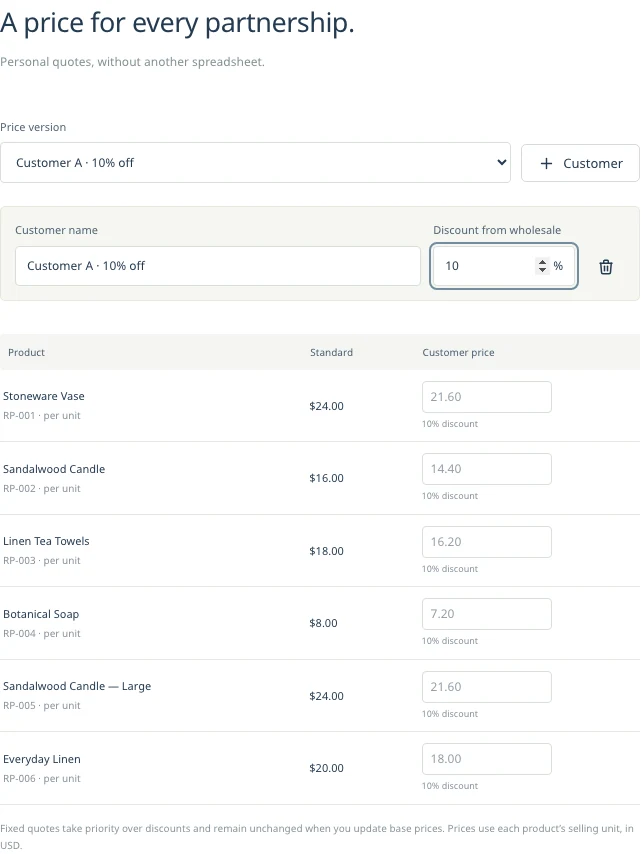
| Customer A | 10% off the base price | $18.00 |
| Customer B | 10% discount, with a $17.50 fixed override on this SKU | $17.50 |
These calculations apply to the wholesale selling unit. If a case contains six units, Customer A’s case price is $108.00. Check the unit, case pack and MOQ together so the buyer can calculate an opening order.
What happens when the base price changes?
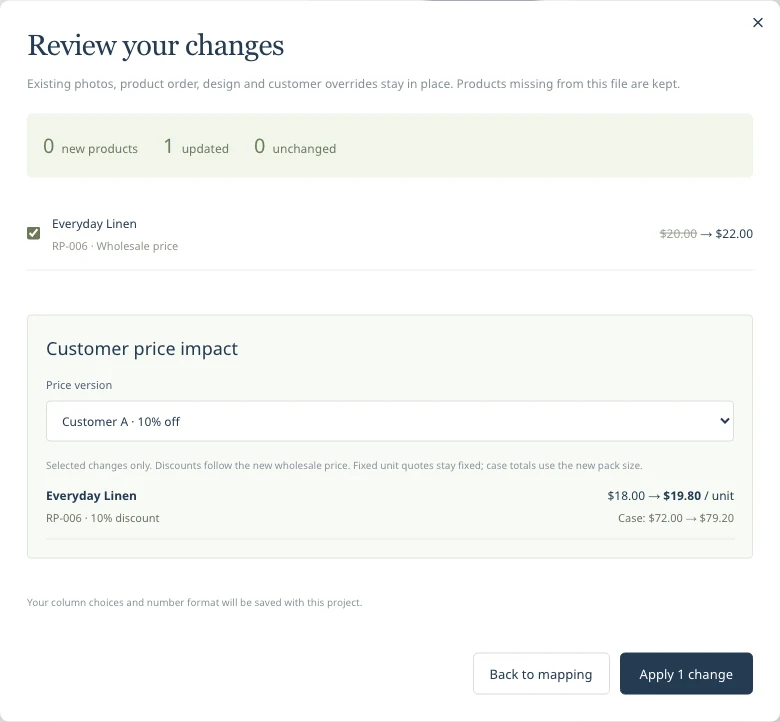
If the same product rises from $20.00 to $22.00, a 10% discount becomes $19.80. A fixed $17.50 override stays $17.50 until you change or remove it. That difference matters: an old negotiated price can otherwise survive a general price increase unnoticed.
The update review shows price impacts for customer versions. Review the overrides before confirming an import. Changing a customer version does not rewrite your standard wholesale prices.
Update an existing catalog by SKU
- Open the saved project and keep a backup of the current version.
- Upload the new CSV with the same SKUs. Review the saved column mappings and number format.
- Inspect changed prices, product details and new SKUs before applying the update.
- Check each customer version, especially fixed-price overrides and case totals.
- Confirm the changes, then review the catalog pages and save the updated project.
Matched products keep their photos, existing order and layout. A SKU not present in the new CSV is not automatically deleted. Remove discontinued items deliberately after checking the import. Renaming a SKU makes it a new identifier, so check for an accidental duplicate product.
Set expectations for a buyer
Use a clear project name and trading terms to explain the price validity period, currency, shipping and payment conditions. The catalog is a reference or quote; it does not reserve stock, collect orders or synchronize your inventory. An availability field is text that you maintain.
A previously shared PDF is a snapshot. Updating a project does not change a file that a buyer already downloaded. With Pro, generate the updated customer versions and send the new files through your usual sales process.
Keep currencies and access separate
Each project has one currency and no automatic exchange-rate conversion. Maintain a separate project for a separately priced currency range. Customer price versions and bulk updates are Pro features. Check the current access information below before starting a customer-specific export workflow.
For a first import, use the CSV preparation guide. For case-heavy catalogs, compare the case-pack pricing template with a compact product list.
What Is a Wholesale Line Sheet? Examples & Checklist
A buyer-ready checklist for SKUs, prices, minimum orders and product details, with examples across different product categories.
Read the guide The import guideFrom product CSV to a line sheet
Organize variants, preserve leading-zero SKUs and match photos. Start with a downloadable product CSV example.
Read the guide